
Good bye MLDonkey, hello Transmission!
Ok, I’ve been a while without updating and althoguh I have some post almost written I wanted to share with you my last piece of code.
As you may remember four years ago I writed about an script which was in charge of setting automatically your MLDonkey rates in order to not overload your bandwith according to the number of clients in your local area network. This script has been running for almost four years and has been a really helpful in achieving the following stats:
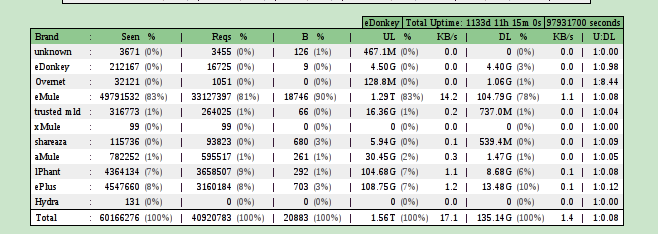
Well, after this past years I’ve been using MLDonkey as my bittorrent client but as it doesn’t support magnet links I’ve decided to move on and give Tranmission a try. Installing it has been a piece of cake and as I was really glad with its web-ui I’ve decided to make it my default client and therefore, remake that script in order to work with this new client!
The code its a port from the past one, but you can see it here: [sourcecode wraplines=”false” language=”bash”] #!/bin/bash #################################################################################### ####################################################################################
A Transmission (http://www.transmissionbt.com/) script that
will vary the download and upload speed limits based on the
number of hosts currently active on the LAN.
#
Very usefull when installed in a mediabox that when being the
only host will set no up/down limits but when a shared connection
will limit to not overload the network
#
Author:
Jaime Bosque jaboto(at)gmail(dot)com
#
This script is based in a previous work from the author plus
- Miguel Mtz (aka) Xarmaz
- aRDi
- tazok de esdebian.org
#
Requirements:
transmission-remote, transmission, grep, nmap, cron
# #################################################################################### ####################################################################################
#———————————————————————————–
Transmission and network vars.
-hosts should be 2 if you are using typical network config (router + mediabox)
but may vary if is in the same box or you have an always-active host
#———————————————————————————– transmission=/usr/bin/transmission-daemon config_file=/home/kets/Transmission-script/settings.json t_remote=/usr/bin/transmission-remote user=transmission pass=transmission lan=192.168.1 server=localhost port=9091 log=/home/kets/Transmission-script/transmission_limits.log hosts=2 #———————————————————————————–
Specific rate settins according to the lan usage
-solo_(up|donw) settings for when just this machine is in lan
-shared_(up|down) settings for when more that this machine are in lan
#———————————————————————————– solo_down=4000 solo_up=4000 shared_down=5 shared_up=5
Detect if transmission is running
running=pidof transmission-daemon | wc -l
pid=pidof transmission-daemon
if [ “$running” == “1” ]; then
# Use nmap to retrieve the number of hosts in lan
hosts_up=nmap -sP $lan.* | grep $lan | wc -l
last_read=tail -n1 $log
hosts_up_before=tail -n1 $log | grep -o -E "H[0-9]+" | grep -o -E [0-9]+
if [ -z “$hosts_up_before” ]; then hosts_up_before=0; fi
# If something has changed in the lan update limits
# echo "Hosts up $hosts_up  vs $hosts_up_before"
if [ "$hosts_up" -ne "$hosts_up_before" ]; then
    if [ "$hosts_up" -gt "$hosts" ]; then
        down_limit=$shared_down
        up_limit=$shared_up
    else
        down_limit=$solo_down
        up_limit=$solo_up
    fi
    #echo "Setting limits $down_limit and $up_limit "
    $t_remote $server:$port -n $user:$pass -d $down_limit
    $t_remote $server:$port -n $user:$pass -u $up_limit

    #Log that changes were done!
    echo `date +"%d/%m/%y -- %H:%M"` "S$running H$hosts_up U$up_limit D$down_limit P$pid" >> $log
fi else
# Log that daemon is not running :_(
echo `date +"%d/%m/%y -- %H:%M"` "Transmission-daemon is not running!" >> $log

# Start transmission daemon with the specified config file
`$transmission -g $config_file`
echo `date +"%d/%m/%y -- %H:%M"` "Transmission-daemon was lunched!" >> $log fi	 exit 0 [/sourcecode]
I’ve also created a github repository that you might like to follow for further changes or to know a bit more about the script and settings.
Hope it helps!