
XFCE display switching (dual & single monitor)
It’s been a long time since I don’t write neither in English nor about computer related stuff. It’s not that I stopped doing things but was a bit lazy about posting them here.
Anyway, a few days ago I bout a new monitor tired of working in a 12’’ screen. I connected it and nothing happened, i mean, there was no signal output so, as usual, I prompted out a terminal and used that wonderful tool called xrandr. Perfect! I worked like a charm until I disconnected it and realized I have no output trough my laptop screen, dammit! and as my key-combination wasn’t working I had to restart it.
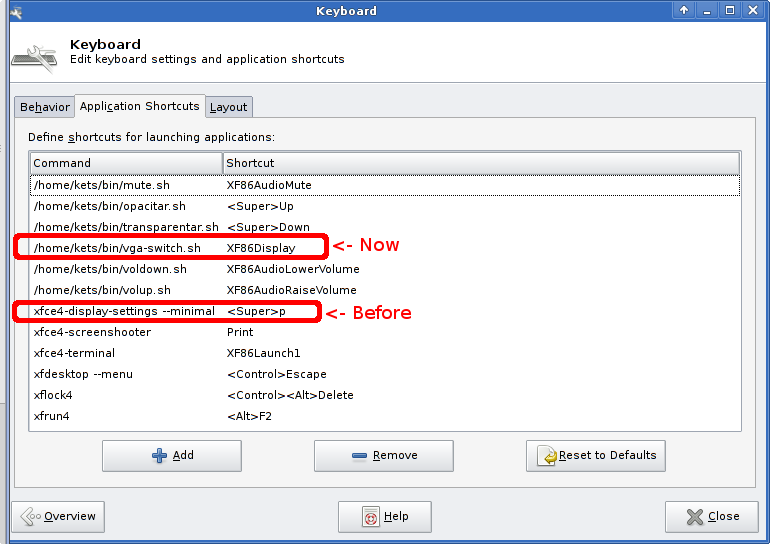
I found that xfce4-settins-manager -> keyboard -> application shortcuts were supposed to launch xfce4-display-settings –minimal which did nothing so, instead of that, based on a script I found in the web (see below) I coded a small script, gave it execution permissions and asigned it to my preferred shortcut (XF86Display - Fn+F7 in my Thinkpad X61s).
Here is the script, working perfectly: [sourcecode language=”bash”] #!/bin/sh
Based on the script from
http://quepagina.es/ubuntarium/vamos-a-personalizar-la-tecla-switch-display-de-portatil.html
Will do a cycling output from state 0 to 2 and use a sound as feedback
State VGA LVDS Beeps
0 0 1 1
1 1 0 2
2 1 1 3
(back to state 0)
#For identifying our monitors use xrandr tool and view output LVDS=LVDS1 # could be another one like: LVDS, LVDS-1, etc VGA=VGA1 # could be another one like: VGA, VGA-1, etc EXTRA=”–right-of $LVDS” # addtional info while dual display
Lets check both LVDS and VGA state from the string “$display connected (“
xrandr | grep -q “$LVDS connected (“ && LVDS_IS_ON=0 || LVDS_IS_ON=1 xrandr | grep -q “$VGA connected (“ && VGA_IS_ON=0 || VGA_IS_ON=1
Output switch cycle
if [ $LVDS_IS_ON -eq 1 ] && [ $VGA_IS_ON -eq 1 ]; then #Go to state 0 -> just LVDS xrandr –output $LVDS –auto xrandr –output $VGA –off beep elif [ $LVDS_IS_ON -eq 1 ]; then #Go to state 1 -> just VGA xrandr –output $LVDS –off xrandr –output $VGA –auto beep && beep elif [ $VGA_IS_ON -eq 1 ]; then #Go to state 2 -> both outputs xrandr –output $LVDS –auto xrandr –output $VGA –auto $EXTRA beep && beep && beep else #This should never be reached but just in case.. xrandr –output $LVDS –auto beep && beep && beep && beep fi [/sourcecode]
As you might already guessed, that script will only work as long as you are logged in a Desktop System (XFCE, Gnome, KDE…) and running the daemon listening to your shortcuts. But there’s no problem, you could also use it from a terminal if you assign it to your acpi event (see this) if you previously know which event is being launched on your combination (use acpid_listen).
Hope it helps!
Comments
Great trick! In my case xfce4-display-settings just keeps waiting an user input to choose the output monitor... something unusable when your main screen does not work properly or It's broken. Thnks!
What version of xfce4-display-settings are you using? That seems nice. Also, I've corrected some mistakes from the scripts where the ampersand where substituted by & so now should work perfectly!
Hi Jaime, I'm currently using 4.8.3 version. I hope this issue is not related to my ATI video card... the linux driver is a pain in the neck.
Hi Nan!
xfce4-display-settings 4.6.5 (Xfce 4.6.2) here <- Not a man in the edge myself...
Used to be Debian unstable but moved to stable after some crashes... and definetly hated gnome 3 so moved to something ligther like Xfce which I used to have long time ago and loved.
When I upgraded to ubuntu 11.10, I had no option to keep using my old Gnome2 so I began to look for something similar (FluxBox, Lxde...). I'm very happy with the look and feel of Xfce and configuration options: simpler & clever. I really hate Unity and Gnome-Shell notebook style. I prefer Synapse to do the quick-launch&search stuff :D
I really like OpenBox as a really lightweigth alternative, combined with Tint2 it's so beautiful! :)
It's a pity you don't have a donate button! I'd without a doubt donate to this fantastic blog! I suppose for now i'll settle for bookmarking
and adding your RSS feed to my Google account. I look
forward to new updates and will talk about this website with my Facebook group.
Talk soon!
Perfect! Thank you man.
[…] Shortcuts, and associate xrandr –auto to Fn+F7. There is an excellent workaround as suggested here: just create the following sh file, place it somewhere (e.g. /etc/acpi/video-switch.sh) and make it […]
in case if anyone needs it, the original code hard coded display names in the code and did not work. i think this is better
xrandr -q | while read a b c d; do
if [ "$b" == "connected" ] ; then
echo "found display: $a"
if [ "$c" == "primary" ]; then
echo "$a" > /tmp/.current_display
else
[ ! -f /tmp/.next_display ] && echo "$a" > /tmp/.next_display
if [ -f /tmp/.current_display ]; then
echo "$a" > /tmp/.next_display
fi;
fi;
fi;
done
xrandr --output $(</tmp/.current_display) --off
xrandr --output $(</tmp/.next_display) --auto --primary
rm /tmp/.current_display
rm /tmp/.next_display