I generally write in Spanish, but this time I’m gonna try to go a step further so more people can get some profit from my experiences.
I’m going to show you how to create a PAN (Personal Area Network) between two computers running Linux using bluetooth devices. This PAN is supoussed to be set up any time you plug your bluetooth adapter.
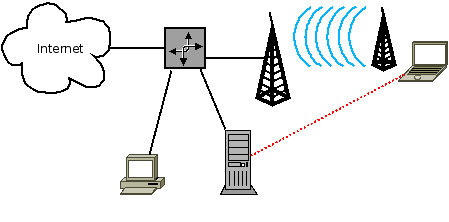
First of all, I’ll try to explain how I have set up my network so the following explanation will be easier to understand, here’s in a simple schema:
My LAN
I have on router with access point, one personal computer, one server (used to P2P, remote login, FTP…) and my laptop. I usually connect to the network using the wireless connection (shown in blue), but sometimes it seems to fail so I get out of connection and I’m too lazy to move some meeters to reset the router. So, in order to avoid this, I’m gonna show you how to create a bluetooth conection between the server and the laptop (shown in red) that can be used as a gateway to the Internet for both my laptop and my mobile phone or as a simple LAN to perform some administration tasks through ssh.
For both sides:
Be ensure that you have the bnep module compiled in your kernel:
`
Networking —>
Bluetooth subsystem support --->
BNEP protocol support
`
**The server side:**
It is using a bluetooth adapter Conceptronic. The MAC will be used in the client side you can use _hcitool dev_ to get it.
First of all edit the _/etc/default/bluetooth_ adding the following lines:
##### `....
PAND_ENABLED=1
PAND_OPTIONS="--listen --role NAP --devup /etc/bluetooth/pan/dev-up"
....
`
This will enable PAND and tell the system how to act, if you see, when the system PAND receives a connection it will execute the /etc/bluetooth/pan/dev-up script which has to be set up like this:
##### `#!/bin/sh
ifup bnep0
ifconfig bnep0 up
ifconfig bnep0 192.168.5.1
ifconfig bnep0 netmask 255.255.255.252
`
Remeber to make it executable and restart the bluetooth system:
##### ` $ chmod +x /etc/bluetooth/pand/dev-up
$ /etc/init.d/bluetooth restart
`
**The client side**
As well as for the server edit the _/etc/default/bluetooth_ adding the following lines (notice the MAC gotten before is now used):
##### `...
PAND_ENABLED=1
PAND_OPTIONS="--connect 00:80:5A:20:4E:F7 --devup /etc/bluetooth/pan/dev-up"
...
`
In the same way, the file specifying how to act when the system notices the connection has to be edited, so here is how _/etc/bluetooth/pan/dev-up_ should look like:
##### `#!/bin/sh
ifup bnep0
ifconfig bnep0 up
ifconfig bnep0 192.168.5.2
ifconfig bnep0 netmask 255.255.255.252
`
Remeber to make it executable and restart the bluetooth system:
##### `$ chmod +x /etc/bluetooth/pand/dev-up
$ /etc/init.d/bluetooth restart
`
Now, everytime you connect the bluetooth adapter, a new interface **bnep0** should be brought up in both sides with the specified rules. You can see it using the ifconfig command. You should be able to do any tasks from both sides like ping, ssh... here's an expample:
##### `root@Stronghold:/etc/bluetooth/pan# ifconfig
bnep0 Link encap:Ethernet HWaddr 00:80:5a:20:4e:f7
inet addr:192.168.5.1 Bcast:192.168.5.3 Mask:255.255.255.252
inet6 addr: fe80::280:5aff:fe20:4ef7/64 Scope:Link
UP BROADCAST RUNNING MULTICAST MTU:1500 Metric:1
RX packets:21 errors:0 dropped:0 overruns:0 frame:0
TX packets:43 errors:0 dropped:0 overruns:0 carrier:0
collisions:0 txqueuelen:1000
RX bytes:3925 (3.8 KiB) TX bytes:7047 (6.8 KiB)`root@Stronghold:/etc/bluetooth/pan# ping 192.168.5.2
PING 192.168.5.2 (192.168.5.2) 56(84) bytes of data.
64 bytes from 192.168.5.2: icmp_seq=1 ttl=64 time=59.9 ms
^C
--- 192.168.5.2 ping statistics ---
1 packets transmitted, 1 received, 0% packet loss, time 0ms
rtt min/avg/max/mdev = 59.977/59.977/59.977/0.000 ms
Additional comments:
* Of course, you will have to change some information as the MAC and the IP address
* If you get the following error:
##### `ExoduS:/home/kets# pand --connect 00:80:5A:20:4E:F7 -n
pand[10820]: Bluetooth PAN daemon version 3.30
pand[10820]: Connecting to 00:80:5A:20:4E:F7
pand[10820]: Connect to 00:80:5A:20:4E:F7 failed. File exists(17)
`
It's because you have already a connection set up in your computer, probably running on the background you can see it with _pand -l_ and destroy it with _pand -K_
* By now I'm just using this connetion as a simple LAN not as a gateway to the Internet. If you wish to do that, you'll have to set up some iptables rules in the server side, these rules are very well explained in the first link of the following section.
Useful links:
[http://www.howtoforge.com/bluetooth_pand_debian_etch](http://www.howtoforge.com/bluetooth_pand_debian_etch)
[http://bluez.sourceforge.net/contrib/HOWTO-PAN](http://bluez.sourceforge.net/contrib/HOWTO-PAN)
Hope it helps & don't hesitate to contact me for any help.
[...] - bookmarked by 3 members originally found by silvertear23 on 2008-11-19 Howto PAN in linux http://hoyhabloyo.wordpress.com/?p=142 - bookmarked by 1 members originally found by [...]
hello2
2012-01-14
good idea to review this aticle in function of new bluetooth 4, because the version 3.x is deprecated and will be removed soon.
Hi,, i was googling extensively on how to share my ethernet(on my pc) with my win 7 laptop. My PC has dual boot, with win 7 as the 2nd OS. I managed to share the net on win7(pc) to win7 (lap). But i can't figure out how to set up to share the internet on linux mint with ,my laptop that runs win7.. Being a noob, it'd be very helpful if you could guide me to a detailed tutorial or guide. I see that your post describes how to create a bluetooth conection between the server and the laptop. I waant to know how to make a PANserver/Ad Hoc network for my win 7 lap to connect to as a PAN user. Thank you. (Forgive me for the poor language)
There shouldn't be any problem while doing what I wrote. You should setup an interface in your Linux box as explained above or here (http://bluez.sourceforge.net/contrib/HOWTO-PAN). Then you should search with your windows laptop for available bluetooth devices.
When they get connected you should be able to ping between both of them, if you can you're almost done!
Last step should be redirecting the incoming traffic from (laptop-> pc) to the wired network. For this you should use:
-> IPTABLES/MASQUERADING, just adding a simple line like (iptables -t nat -A PREROUTING -o eht0? -j MASQUERADE) being eth0 your nic (see with ifconfig).
-> Enable ip_forwarding in kernel level (echo 1 > /proc/sys/net/ipv4/ip_forward)
And in your Win lapot specifying as DNS server (setup manually in network bluetooth controller) the address of your current router in the linux box and your default gateway the ip of the bluetooth in the linux box.
What will happen is that when you try to use the internet in your Win laptop it will look for the gateway specifyed (the linux), the linux will take the incoming request, transform it with NAT, make itself the request and redirect it back to the Win laptop.
Como siempre, y pese a haber dejado de escribir en este blog (ya no prometo a nadie, ni siquiera a mí mismo, que es algo que retomaré) me gusta recopilar el ...
Ya, ya sé que hace muchísimo tiempo que no escribo pero creo que no hay mejor excusa para volver a desoxidar mis dedos y poner mis pensamientos en orden que ...
Pereza, falta de tiempo, falta de motivación… da igual, el caso es que ya no escribo por aquí. Es un hecho. De todos modos, resumir el año en unas pocas líne...
Hace ya muchos años que el azar juntó a un grupo de jóvenes en una residencia estudiantil de un pequeño pueblo cerca de Copenhague. Algunos son (somos) inca...

Comments
Hey dude,
I remember your first steps doing stuff with bluetooth. It's a nice post :)
Perhaps someday, we should date and hack a bit about bluez :)
Best!
[...] - bookmarked by 3 members originally found by silvertear23 on 2008-11-19 Howto PAN in linux http://hoyhabloyo.wordpress.com/?p=142 - bookmarked by 1 members originally found by [...]
good idea to review this aticle in function of new bluetooth 4, because the version 3.x is deprecated and will be removed soon.
Thanks for your comment,I will consider it but i am a bit outdated about this... wrote it 3 years ago... :)
Hi,, i was googling extensively on how to share my ethernet(on my pc) with my win 7 laptop. My PC has dual boot, with win 7 as the 2nd OS. I managed to share the net on win7(pc) to win7 (lap). But i can't figure out how to set up to share the internet on linux mint with ,my laptop that runs win7.. Being a noob, it'd be very helpful if you could guide me to a detailed tutorial or guide. I see that your post describes how to create a bluetooth conection between the server and the laptop. I waant to know how to make a PANserver/Ad Hoc network for my win 7 lap to connect to as a PAN user. Thank you. (Forgive me for the poor language)
Hi Vasu,
There shouldn't be any problem while doing what I wrote. You should setup an interface in your Linux box as explained above or here (http://bluez.sourceforge.net/contrib/HOWTO-PAN). Then you should search with your windows laptop for available bluetooth devices.
When they get connected you should be able to ping between both of them, if you can you're almost done!
Last step should be redirecting the incoming traffic from (laptop-> pc) to the wired network. For this you should use:
-> IPTABLES/MASQUERADING, just adding a simple line like (iptables -t nat -A PREROUTING -o eht0? -j MASQUERADE) being eth0 your nic (see with ifconfig).
-> Enable ip_forwarding in kernel level (echo 1 > /proc/sys/net/ipv4/ip_forward)
And in your Win lapot specifying as DNS server (setup manually in network bluetooth controller) the address of your current router in the linux box and your default gateway the ip of the bluetooth in the linux box.
What will happen is that when you try to use the internet in your Win laptop it will look for the gateway specifyed (the linux), the linux will take the incoming request, transform it with NAT, make itself the request and redirect it back to the Win laptop.
Hope it helps!!
Good post. I learn something new and challenging on websites I stumbleupon everyday.
It will always be helpful to read content from other authors and practice
something from their websites. . youtube
youtube
youtube
Hmm is anyone else experiencing problems with the images on this blog
loading? I'm trying to determine if its a problem on my end or if it's the blog.
Any feed-back would be greatly appreciated.